 ContractorKeith
 My Macbook Air is my workhorse and main coding machine. My Mac Studio has 64 GB of memory. The MacBook Air has 24GB. Both are M2 silicon Macs. And every task my coding agents ran went out to a cloud model, while the bigger machine sat there doing almost nothing.
On October 6, 2026, I fixed that. By the end of the day the Air was sending coding tasks across my network to a Qwen 3.8 27B 4bit running on the Studio. The model wrote the tests, ran them in a sandbox, and handed back a diff for Claude to review. Nothing left my own network.
This is the whole build, start to finish. The commands I ran. The five things that broke. What it actually costs in time. And the small MCP server that turns the Studio into a junior engineer my coding agents can hand work to.
All the code is public in mlx-worker on GitHub: the server setup scripts, the launch agent, the Tailscale helper, and the worker.
You don’t need a Mac Studio. You need two Macs. In my case the Mac Studio is 64GB so has room to run decent models (not very fast) and sits on my desk, which I never sit at anymore. My Macbook Air is my main workhorse.
The “server” can be any Apple Silicon Mac with enough memory: a Studio, a Mac mini, an old MacBook Pro you don’t travel with anymore. The “client” is whatever laptop you actually code on. I’ll call them the server and the laptop from here on, and use my machines as the worked example.
What we’re building
Here’s the shape of it.
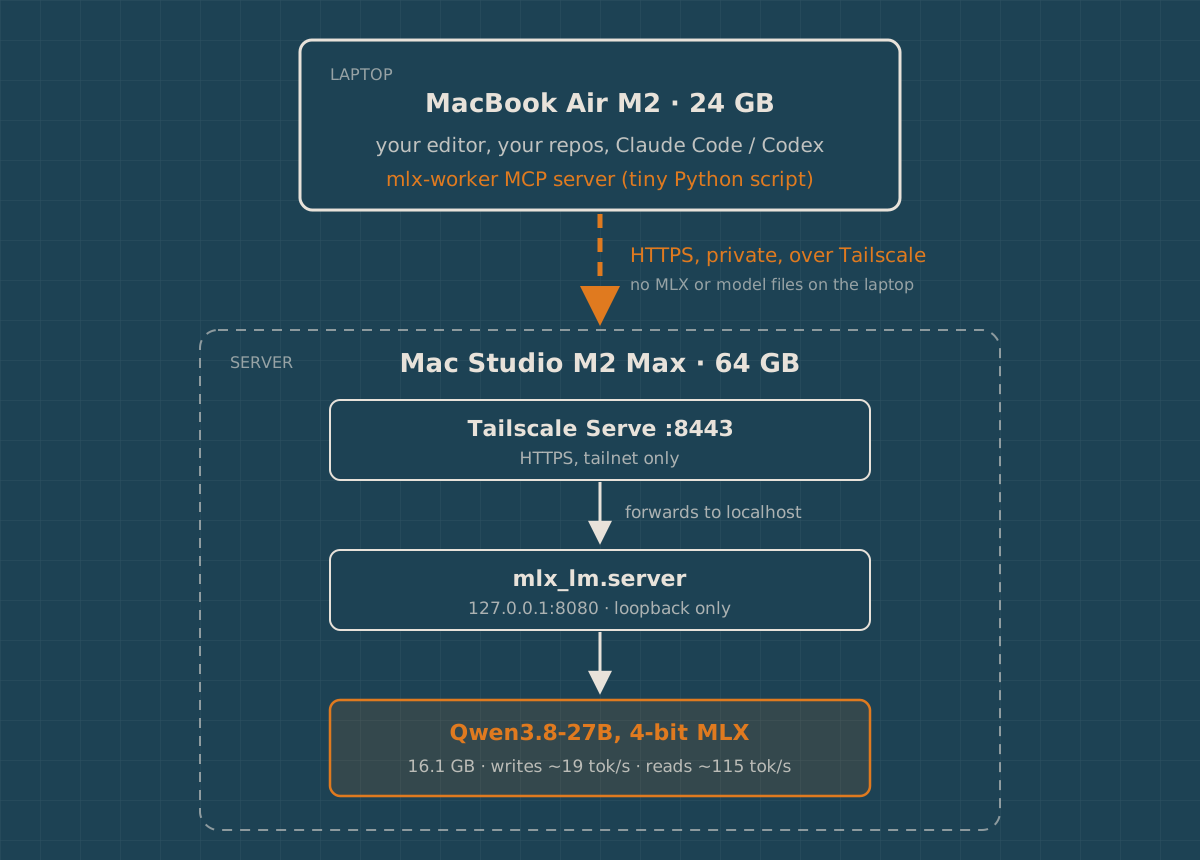
Three layers, and each one has a single job.
- MLX LM runs the model on the server and exposes an OpenAI-style chat API on
127.0.0.1. Apple’s MLX framework is built for Apple Silicon’s unified memory, so a Mac with a lot of RAM can hold models that won’t fit on most consumer graphics cards. - Tailscale Serve gives that local port a private HTTPS address that only devices on your tailnet can reach. The model server never listens on your LAN or the internet.
- An MCP server on the laptop lets your coding agent call the model as a worker, inside an isolated git worktree, with tests.
The laptop never downloads the model or installs MLX. It just makes HTTP calls.
Before you start
My setup, for reference. Yours can differ.
| Server | Laptop | |
|---|---|---|
| Machine | Mac Studio M2 Max | MacBook Air M2 |
| Memory | 64 GB | 24 GB |
| macOS | 26.6 | 26.x |
| Python | 3.12 (Homebrew) | system python3 |
| Network | Tailscale | Tailscale |
A few ground rules I learned the hard way:
- Memory decides the model, not CPU. The 4-bit 27B model I picked is 16.1 GB on disk. It also needs room for its working memory and for macOS itself. On 64 GB that’s comfortable. On a 16 GB Mac, pick something in the 7B to 8B range instead.
- Use native arm64 Python 3.11 or newer. Current MLX LM needs at least 3.11. An Intel or Rosetta Python won’t work.
- Both machines need to be on the same tailnet. Tailscale’s free personal plan was enough for me.
If you’d rather click than type, LM Studio and Ollama both do local models on a Mac. I skipped both on purpose. I wanted to see every piece, and I wanted the model server to be one command I understand.
Part 1: set up the server
Everything in this part happens on the server. I did it over SSH from the laptop, which turned out to matter later, so I’ll show it that way.
Check you can reach it
On the laptop, make sure Tailscale is running and the server shows up.
tailscale status
tailscale ping your-server-name
My first surprise was here. Tailscale on the Air said “Tailscale is stopped.” I’d never noticed. tailscale up fixed it, and then my Studio showed up as keiths-mac-studio with a 100.x.y.z address.
If SSH is already turned on for the server (System Settings, General, Sharing, Remote Login), add a short alias to ~/.ssh/config on the laptop:
Host studio
  HostName 100.98.189.17
  User [insert-username]
Use your server’s Tailscale IP and your username. Now ssh studio gets you in.
Check the hardware and Python
uname -m
sw_vers -productVersion
python3 --version
You want arm64 and Python 3.11 or newer. My default python3 was 3.14 from Homebrew, which was newer than I wanted to bet on for MLX wheels. Homebrew also had 3.12 installed, so I used that one explicitly.
Make a dedicated environment
Keep the model server in its own virtual environment. It won’t collide with anything else you experiment with.
mkdir -p ~/venvs ~/local-ai-studio/logs ~/AI
/opt/homebrew/bin/python3.12 -m venv ~/venvs/mlx-server
source ~/venvs/mlx-server/bin/activate
python -m pip install --upgrade pip
python -m pip install --upgrade 'mlx-lm>=0.31.3' huggingface_hub
python -m pip show mlx mlx-lm | grep -E '^(Name|Version)'
That gave me MLX 0.32.3 and MLX LM 0.32.0.
Pick where the model lives
My plan said to keep models on an external 2 TB SSD. When I went to use it, that SSD had been repurposed months earlier for a Git server, and there was no ai-ssd volume left.
And even if there had been, it wouldn’t have worked over SSH. macOS privacy protection blocks an SSH session from reading external drives unless you grant extra permission. I hit Operation not permitted just listing the drive.
So I kept everything on the internal disk, in ~/AI. The Studio had 598 GB free. If you do want an external drive, start the server from a local Terminal on that Mac, or give sshd Full Disk Access, and know which one you chose.
(I plan to set this up to run on the external 2TB SSD later)
Write a small config file
This file sets where Hugging Face stores downloads and which model to serve. Every other script sources it.
cat > ~/local-ai-studio/env.sh <<'EOF'
# Source this file; do not execute it directly.
export AI_ROOT="$HOME/AI"
export MLX_MODEL="mlx-community/Qwen3.8-27B-4bit"

if [[ ! -d "$AI_ROOT" ]]; then
  printf 'Storage directory is missing: %s\n' "$AI_ROOT" >&2
  return 1
fi

# If AI_ROOT is an external drive, refuse to run when it is not mounted.
case "$AI_ROOT" in
  /Volumes/*)
    if ! /sbin/mount | /usr/bin/grep -F " on $AI_ROOT (" >/dev/null; then
      printf 'Expected external volume is not mounted: %s\n' "$AI_ROOT" >&2
      return 1
    fi
    ;;
esac

export HF_HOME="$AI_ROOT/hf"
export HF_HUB_CACHE="$HF_HOME/hub"
# The model is public. Never send a stored, possibly expired, Hugging Face token.
export HF_HUB_DISABLE_IMPLICIT_TOKEN=1
EOF
That last line is there because of a real failure. More on it in a second.
Download the model
Check the model exists before pulling 16 GB:
source ~/venvs/mlx-server/bin/activate
python -c "from huggingface_hub import HfApi; i=HfApi(token=False).model_info('mlx-community/Qwen3.8-27B-4bit', files_metadata=True); print(round(sum(s.size or 0 for s in i.siblings)/1e9,1), 'GB, gated:', i.gated)"
Then download it in the background so a dropped SSH session doesn’t kill it:
source ~/venvs/mlx-server/bin/activate
source ~/local-ai-studio/env.sh
mkdir -p "$HF_HUB_CACHE"
nohup hf download "$MLX_MODEL" > ~/local-ai-studio/logs/download.log 2>&1 &
Here’s the failure I mentioned. My first metadata check came back 401 Repository Not Found for a public model. The Studio had a Hugging Face login saved from months ago, the token had expired, and the client kept sending it anyway. Hugging Face rejected the expired token instead of treating me as anonymous.
HF_HUB_DISABLE_IMPLICIT_TOKEN=1 tells the tools to stop sending the stored token. If you need gated or private models later, run hf auth login again instead.
The download took under ten minutes on my connection and landed at 15 GiB on disk, which is the same 16.1 GB in different units.
The start script
cat > ~/local-ai-studio/start.sh <<'EOF'
#!/bin/bash
set -euo pipefail

source "$HOME/local-ai-studio/env.sh"
# Serve only the already-downloaded model; never reach Hugging Face at startup.
export HF_HUB_OFFLINE=1

SERVER="$HOME/venvs/mlx-server/bin/mlx_lm.server"

exec "$SERVER" \
  --model "$MLX_MODEL" \
  --host 127.0.0.1 \
  --port 8080 \
  --allowed-origins "" \
  --decode-concurrency 1 \
  --prompt-concurrency 1 \
  --prompt-cache-size 1 \
  --chat-template-args '{"enable_thinking":false}' \
  --temp 0.7 \
  --top-p 0.8 \
  --top-k 20 \
  --max-tokens 2048
EOF
chmod +x ~/local-ai-studio/start.sh
Why these flags:
--host 127.0.0.1keeps the server off your network. Tailscale will be the only way in. MLX LM’s own docs warn that its server has only basic security checks, so don’t skip this.--allowed-origins ""blocks random web pages from calling it from a browser.- The two concurrency flags mean one request at a time. On one machine, that’s honest about what you have.
enable_thinking: falsemakes the default fast. Clients can turn thinking on per request.HF_HUB_OFFLINE=1means the server starts even when the internet is down.
Before trusting someone else’s flags, mine included, check them against your installed version:
~/venvs/mlx-server/bin/mlx_lm.server --help | grep -E -- '--(allowed-origins|decode-concurrency|prompt-cache-size|chat-template-args)'Start it and test it locally
nohup ~/local-ai-studio/start.sh > ~/local-ai-studio/logs/server.log 2>&1 &It took about 33 seconds to load and start listening. Then, still on the server:
curl --fail-with-body -sS --max-time 300 http://127.0.0.1:8080/v1/chat/completions \
  -H 'Content-Type: application/json' \
  -d '{
    "model": "mlx-community/Qwen3.8-27B-4bit",
    "messages": [{"role": "user", "content": "Explain what a reverse proxy does in two sentences."}],
    "max_tokens": 150
  }'
Seven seconds later I had two correct sentences about reverse proxies. That was the first moment it felt real.
Don’t go any further until this step works. Every networking problem later is easier when you know the model itself is fine.
Part 2: give it a private address
Now the laptop needs a way in. This is where Tailscale Serve earns its keep.
Check what’s already there
tailscale serve statusDo this before anything else. Mine already had a rule on HTTPS port 443, pointing at a local service on port 4460 that wasn’t even running anymore. Probably left over from an old experiment. I didn’t want to break whatever that was, so I used a different port.
Turn it on
tailscale serve --bg --https=8443 http://127.0.0.1:8080
tailscale serve status
Serve prints your address. Mine is https://keiths-mac-studio.<tailnet>.ts.net:8443. Yours will have your machine name and tailnet. If it asks you to enable HTTPS for your tailnet, follow the link it gives you.
Two things about this command:
- Serve, not Funnel. Serve is private to your tailnet. Funnel puts it on the public internet. You want Serve.
--bgkeeps the Serve rule after a restart. It does not restart the model. Those are separate.
Part 3: call it from the laptop
Back on the laptop. No MLX here. Just curl.
export MLX_WORKER_URL="https://your-server.your-tailnet.ts.net:8443"

curl -sS "$MLX_WORKER_URL/v1/models"
That should list your model. Then ask for something real:
curl --fail-with-body -sS --max-time 300 "$MLX_WORKER_URL/v1/chat/completions" \
  -H 'Content-Type: application/json' \
  -d '{
    "model": "mlx-community/Qwen3.8-27B-4bit",
    "messages": [{"role": "user", "content": "Write a TypeScript function that converts square feet to square meters. Include three example tests."}],
    "max_tokens": 700
  }'
From the Air, over Tailscale: 125 tokens back in about 7 seconds, with the right conversion factor, 0.09290304. I checked.
Thinking mode, and its trap
Qwen can reason before it answers. You turn it on per request:
curl --fail-with-body -sS --max-time 1800 "$MLX_WORKER_URL/v1/chat/completions" \
  -H 'Content-Type: application/json' \
  -d '{
    "model": "mlx-community/Qwen3.8-27B-4bit",
    "messages": [{"role": "user", "content": "Write a TypeScript function isValidZip(code: string): boolean for US ZIP or ZIP+4. Four short tests. Keep it brief."}],
    "chat_template_kwargs": {"enable_thinking": true},
    "temperature": 1.0, "top_p": 0.95, "top_k": 20,
    "max_tokens": 8192
  }'
That one took 22 seconds and 367 tokens. The reasoning came back in its own field, and the answer was a clean one-line regex with four tests.
But my first thinking test was bigger. I asked for an interval-merge function with input validation, no mutation, and edge-case tests. It thought for 471 seconds. It used all 8,192 tokens. It never answered.
It wasn’t stuck in a loop. I read the reasoning. It was carefully working through whether -0 and 0 should sort the same, and how to write a comparator that never returns Infinity. Good questions. It just ran out of room before writing any code.
So how fast is it, really? My first answer was “about 17 tokens a second,” worked out from that one long run. Later I measured it properly, streaming from the Studio itself so reading the prompt and writing the answer show up separately. Three runs each, and they barely moved:
| What I sent | Prompt size | Wait before the first token | Writing speed |
|---|---|---|---|
| Short question, 600 tokens back | 37 tokens | about 1 second | 19 tokens/sec |
| A 5,800-token log to summarize | 5,798 tokens | 51 seconds | 18 tokens/sec |
Writing holds steady at 18 to 19 tokens a second. Reading is the part nobody talks about. The Studio reads your prompt at roughly 115 tokens a second, so a big prompt means a long, silent wait before anything comes back. That’s also why my delegations later took close to a minute each. Every attempt sends whole files.
If you want your own numbers, this is the script I used. Run it on the server so the network stays out of it:
import json, time, urllib.request

URL = "http://127.0.0.1:8080/v1/chat/completions"
body = {"model": "mlx-community/Qwen3.8-27B-4bit", "max_tokens": 600, "stream": True,
        "stream_options": {"include_usage": True},
        "messages": [{"role": "user", "content": "Explain how a reverse proxy works in 500 words."}]}
req = urllib.request.Request(URL, json.dumps(body).encode(), {"Content-Type": "application/json"})
start, first, usage = time.time(), None, {}
with urllib.request.urlopen(req, timeout=900) as response:
    for raw in response:
        line = raw.decode().strip()
        if not line.startswith("data:") or line == "data: [DONE]":
            continue
        chunk = json.loads(line[5:])
        usage = chunk.get("usage") or usage
        if first is None and any((c.get("delta") or {}).get("content") for c in chunk.get("choices", [])):
            first = time.time()
end = time.time()
print(f"prompt {usage['prompt_tokens']} tokens, first token after {first - start:.1f}s, "
      f"writing at {usage['completion_tokens'] / (end - first):.1f} tokens/sec")
Short answers feel quick. Thinking mode on a big task can eat eight minutes and still come back empty. Check finish_reason. If it says length, the task was too big, not the model too dumb. Make the task smaller.
Point any OpenAI-compatible client at it
Most tools that let you add a custom provider want the same four things.
| Field | Value |
|---|---|
| API type | OpenAI-compatible Chat Completions |
| Base URL | https://your-server.your-tailnet.ts.net:8443/v1 |
| Model | mlx-community/Qwen3.8-27B-4bit |
| API key | any placeholder, like local, if the client insists |
The placeholder key isn’t security. Tailscale is the security. “OpenAI-compatible” also doesn’t mean every feature works, so test with curl first and then with your client.
At this point you have a private model you can chat with from your laptop. That’s useful. It’s not what I wanted, though.
Part 4: make it a worker your coding agent can use
I work with a frontier model as the lead: Claude Code plans, reviews, and owns the result. What I wanted was for that lead to hand small, boring coding tasks to the Studio, the way a senior engineer hands a junior a ticket. Without letting the junior touch my working copy.
A chat endpoint doesn’t do that. A local model on the other end of an HTTP call can’t read my repo, can’t run my tests, and has no business editing files on my laptop.
So Claude Code and I wrote a small MCP server. It’s the worker half of mlx-worker. It runs on the laptop, and Claude Code, Codex, and Grok all speak MCP, so one server covers all of them.
The loop
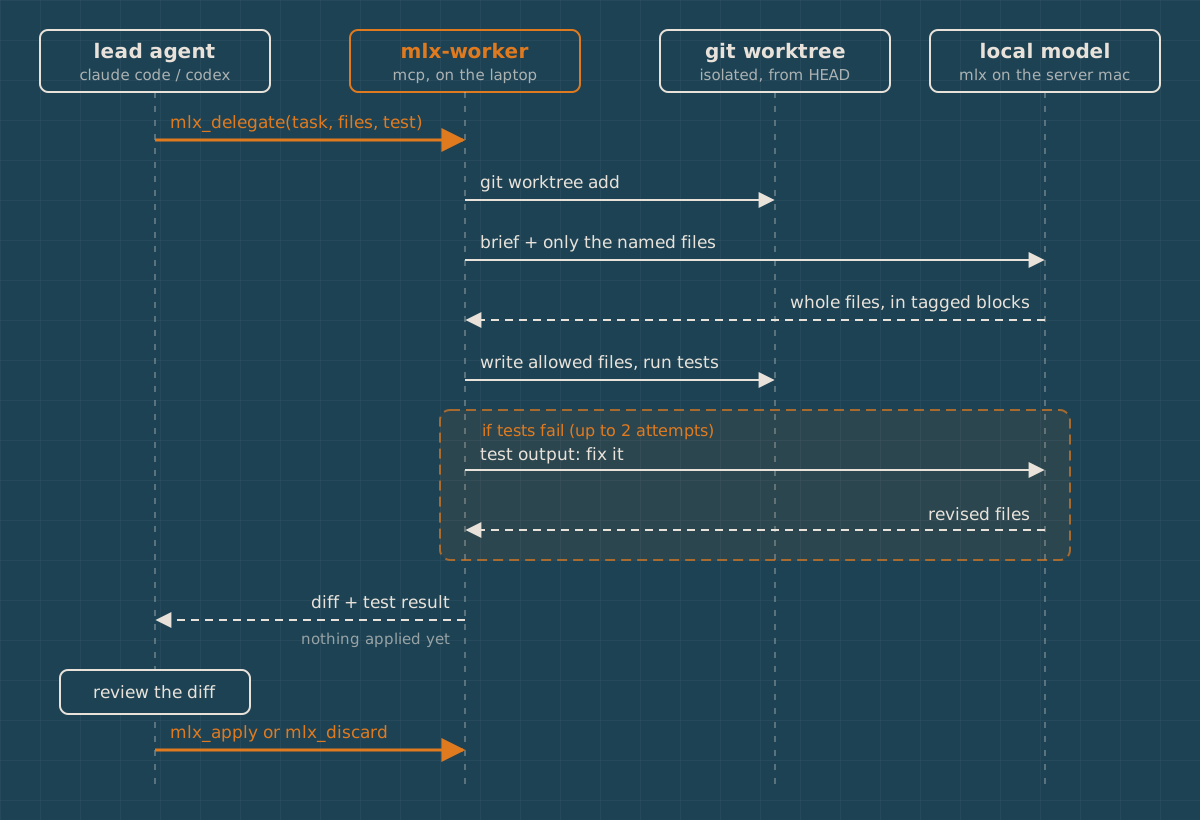
Five tools. In my private first version they were called studio_*; the public repo names them mlx_*:
mlx_statuschecks the server is up.mlx_generatesends one prompt and returns text.mlx_delegateruns the loop above and returns a diff.mlx_applyputs that diff into your working copy, uncommitted.mlx_discardthrows it away.
The rules I built in, because a weaker model will eventually do something dumb:
- It only sees the files you name.
- It can only write the files you allow. Anything else it returns is rejected and listed.
- It works in a separate git worktree. Your checkout is untouched until you call
mlx_apply. - It never commits. Ever.
- It gets two tries by default, with the test output fed back after a failure.
The server is plain Python with no dependencies. That was deliberate. It has to run on the Air and on a Lenovo running Omarchy Linux with whatever python3 is there.
How the model hands back files
Getting reliable structured output from a local model is the whole game. I tried the simplest thing that could work: ask for whole files, not diffs, wrapped in markers.
SYSTEM_PROMPT = """You are a careful software engineer working on one bounded task.
Change only the files you are allowed to write. Return every changed or new file
IN FULL using exactly this format, one block per file, copying the tag {tag} exactly:

<<<FILE relative/path/from/repo/root {tag}
complete file contents
>>>END {tag}

Before the blocks you may write at most three sentences of summary."""
Whole files, because a 27B model writes a correct full file far more often than a correct unified diff. And see that {tag}? That’s there because my first version didn’t have one, and it broke on the very first real test.
The first real test failed, and I’m glad it did
To test the worker, I had the Studio write unit tests for the worker’s own parser. The function that reads those <<<FILE blocks.
Think about what that test file has to contain. Marker lines. The exact strings my parser was looking for.
So the model returned a perfectly good test file, and my parser read the first >>>END inside the test code as the end of the file. It chopped the file in half, then treated the rest of the reply as two more files with garbage names, and rejected them. Both attempts failed the same way.
That’s the same reason shell heredocs let you pick your own delimiter. The fix was to give every task a random tag:
def _block_pattern(tag):
    """FILE-block regex; with a tag, only markers carrying that exact tag count."""
    t = re.escape(tag)
    return re.compile(rf"<<<FILE (?P<path>[^\n]+?) {t}\n(?P<body>.*?)\n?>>>END {t}", re.DOTALL)

tag = "T" + uuid.uuid4().hex[:8]   # new for every task
Now a file can talk about >>>END all it wants. Only >>>END T3f9a12bc closes it.
I reran the same delegation. First attempt, 58 seconds, 582 tokens, five tests, all passing. I read the diff the way I’d read a junior’s PR. It was good. It had built the marker strings by concatenation, like I asked, so the test file itself never contains a literal marker line. It was missing one case: the exact untagged >>>END line that caused the original bug. So I applied it and added that test myself.
Delegate, test in isolation, review, keep or repair. That’s the whole point, and it worked on day one.
The other thing that would have bitten me
Before writing a skill for this, I had a fresh agent plan three delegations without any guidance, to see what it would get wrong. Its judgment was good. It kept a concurrency bug for itself and only delegated the regression test. It noticed the worker can’t see uncommitted edits.
But every test command it wrote would have failed. npx vitest run ... and cargo test ..., run inside a fresh git worktree.
A worktree only has tracked files. No node_modules. No Rust target folder. I checked on one of my real repos and npx refused to even start. Rust would have recompiled the whole project from scratch and blown through the five-minute test timeout.
So the worker now links the repo’s dependency folders into each worktree and keeps them out of the diff:
LINKED_DEPENDENCY_DIRS = ("node_modules", ".venv", "venv")

def _link_dependencies(root, worktree):
    linked = []
    for name in LINKED_DEPENDENCY_DIRS:
        source, target = root / name, worktree / name
        if source.is_dir() and not target.exists():
            target.symlink_to(source, target_is_directory=True)
            linked.append(name)
    return linked

def _stage(worktree, linked):
    excludes = [f":(exclude){name}" for name in linked]
    _git(worktree, "add", "-A", "--", ".", *excludes)
It also exports MLX_WORKER_REPO to the test command, so a Rust project can reuse the original build cache:
CARGO_TARGET_DIR="$MLX_WORKER_REPO/src-tauri/target" cargo test --manifest-path src-tauri/Cargo.toml my_testSmall detail. The difference between a worker that works and one that fails every time for a reason that has nothing to do with the model.
Register it with your agents
The server is one script. Register it once per agent.
# Claude Code (user scope, every project)
claude mcp add -s user mlx-worker -e MLX_WORKER_URL=https://your-server.your-tailnet.ts.net:8443 \
  -- ~/mlx-worker/bin/mlx-worker-mcp

# Codex
codex mcp add mlx-worker --env MLX_WORKER_URL=https://your-server.your-tailnet.ts.net:8443 \
  -- ~/mlx-worker/bin/mlx-worker-mcp
Delegated calls take minutes, and MCP clients time out much sooner than that by default. I raised both. In ~/.claude/settings.json, the value is milliseconds:
{ "env": { "MCP_TOOL_TIMEOUT": "1800000" } }In ~/.codex/config.toml, it’s seconds, on the server’s own entry:
[mcp_servers.mlx-worker]
tool_timeout_sec = 1800
Then I wrote a short skill that tells any agent when to delegate and when not to. If it’s a single file with a clear test and no design decisions, delegate it. If it touches concurrency, security, or data migrations, or it’s faster to write than to explain, keep it. And always check git status first, because the worker branches from your last commit and can’t see what you haven’t committed yet.
Living with it
Day-to-day operation is three commands on the server.
# start
nohup ~/local-ai-studio/start.sh > ~/local-ai-studio/logs/server.log 2>&1 &

# stop
pkill -f mlx_lm.server

# is it up?
lsof -nP -iTCP:8080 -sTCP:LISTEN
I tested a stop and restart from the Air. Back up and answering in about 38 seconds.
Record what worked, so future-you can rebuild it:
~/venvs/mlx-server/bin/python -m pip freeze > ~/local-ai-studio/requirements-known-good.txtAnd make sure the server doesn’t sleep. On mine, pmset -g already showed sleep 0. On a Mac mini or laptop, check System Settings, Energy, and stop it sleeping when the display is off.
Keeping it running
The model server above survives an SSH logout but not a reboot. Since writing the first version of this, I packaged the whole server side, plus the worker, as mlx-worker. Its server/launchagent.sh install runs the model as a launch agent. I tested it on the Studio by killing the server process on purpose, and launchd had it back up and answering on its own.
One catch. A launch agent starts when you log in. If your server Mac reboots, the model comes back when someone logs in, or at boot if automatic login is on.
I also haven’t connected the Lenovo yet. It should be the same as Part 3, because the laptop side is only HTTP.
The five things that broke
If you skim nothing else, skim this.
| What broke | Why | Fix |
|---|---|---|
| Public model returned 401 | Expired Hugging Face token was still being sent | HF_HUB_DISABLE_IMPLICIT_TOKEN=1 |
| Couldn’t read the external SSD | macOS blocks SSH sessions from external drives | Internal storage, or start from a local Terminal |
| Port 443 was taken | An old Tailscale Serve rule I’d forgotten about | Use --https=8443, leave the old rule alone |
| Thinking mode returned nothing | 8,192 tokens of reasoning, no room left to answer | Smaller tasks; check finish_reason |
| Delegated tests cut in half | The test file contained my parser’s own markers | A random tag per task in the markers |
And one that would have broken without that test run: test commands failing in a fresh worktree because node_modules and build caches aren’t there.
Was it worth it
Honest answer: I don’t know yet. It’s been one day.
Here’s what I do know. At 18 to 19 tokens a second, with a long wait whenever the prompt is big, the Studio isn’t going to replace a frontier model. It’s slower, and it’s a junior. A single-file task with a clear test comes back in under a minute, and I still review every line. Anything that needs judgment stays with Frontier Models.
But the code it writes costs me nothing per token, it never leaves my house, and the machine was sitting there anyway. If it picks up the tests and the helpers and the boilerplate on even a few tickets a week, that’s real.
The plan now is to use it on real tickets, write down what gets accepted, what needs repair, and what gets kicked back up, and let the numbers decide.
If you build something like this on your own hardware, I’d like to hear what broke for you. I’m betting it’s not the same five things.
Resources
Everything I used, plus a few links I’d want if I were starting over.
The code from this guide
- mlx-worker on GitHub, the server setup scripts, launch agent, Tailscale Serve helper, the MCP worker, and the delegation skill
MLX and the model
- Apple MLX documentation, the framework the model runs on
- MLX on GitHub
- MLX LM on GitHub, the package that provides
mlx_lm.server - MLX LM server documentation, every flag and the security warning about the bundled server
- mlx-community/Qwen3.8-27B-4bit, the exact model I served
- mlx-community on Hugging Face, where to find other MLX-converted models in different sizes
Hugging Face downloads
- Hugging Face CLI guide, for
hf downloadandhf auth login - Hugging Face environment variables, including
HF_HOME,HF_HUB_CACHE,HF_HUB_OFFLINE, andHF_HUB_DISABLE_IMPLICIT_TOKEN
Tailscale
- Download Tailscale for both machines
- Tailscale Serve, sharing a local service privately inside your tailnet
tailscale servecommand reference- Tailscale Funnel, the public version, so you know what not to turn on
- Tailscale CLI, including how to get the
tailscalecommand on macOS
Connecting coding agents
- Model Context Protocol, the standard the worker speaks
- Claude Code MCP documentation, adding servers and the
MCP_TOOL_TIMEOUTsetting - Codex MCP documentation, adding servers and
tool_timeout_sec git worktree, how the worker gets an isolated copy of your repo
Keeping the server running
- Apple’s guide to launchd jobs, for turning the start script into a launch agent
If you’d rather not build it by hand